
Originally published in Portuguese on 20 November 2026: Portuguese version.
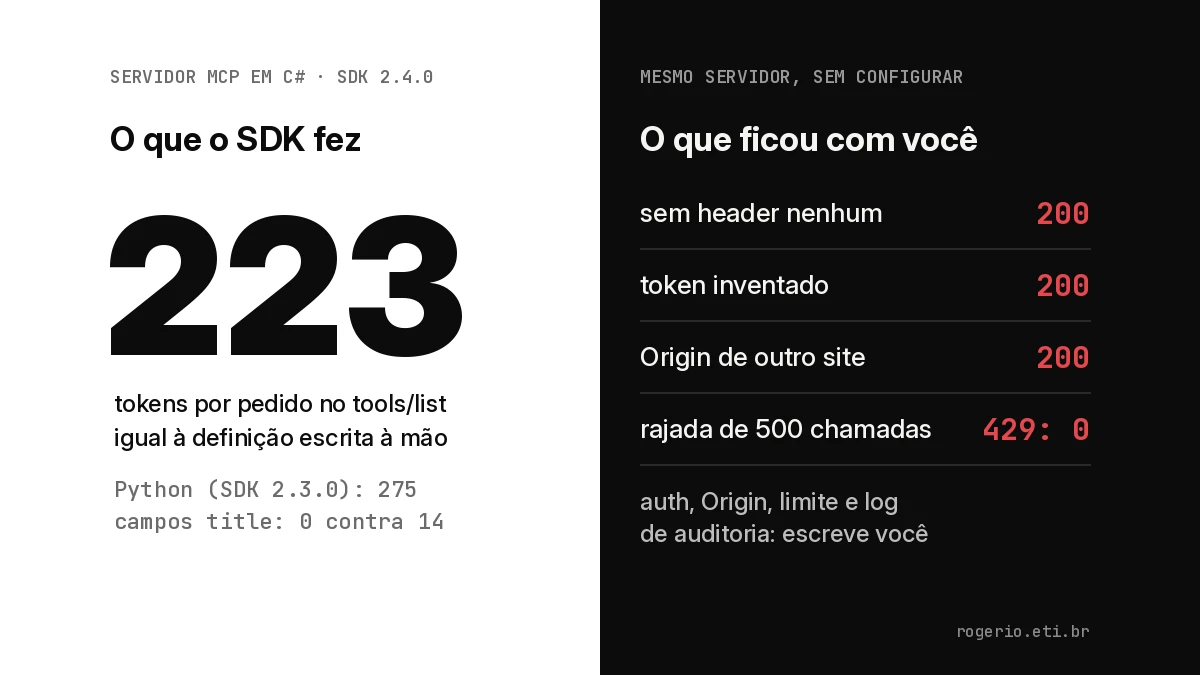
My C# MCP server answered 200 to a client that sent no credentials at all, and the definitions its tools/list hands out cost 223 tokens per request. I used the official SDK 2.4.0 and the same 4 tools from demo 13. That is the same cost as the hand-written definition, against 275 for the Python server. The SDK got that part right. Everything else I measured came wide open: with no header, with a made-up token and with an Origin from another site, the answer was 200 in all three cases. A burst of 500 calls went through in full, with 0 429 responses.
The code is in the repository: demos/16-mcp-servidor-csharp. It runs on CPU, with no account and no key.
Why measure the server side?
In the 10 November 2026 article I measured the consumer side: how much context the same tool takes up as MCP, as an API function and as a Skill. The Python MCP came out 52 tokens more expensive than the hand-written definition, because of title fields that Pydantic puts in the JSON Schema.
That left the question from the other side. If I’m the .NET dev who will expose tools to an agent, what does the SDK give me ready-made and what do I write by hand?
What is the resource?
The Model Context Protocol C# SDK, maintained in the official MCP project. I used the ModelContextProtocol.AspNetCore package 2.4.0, published on NuGet on 7 November 2026, Apache-2.0 license. It brings the MCP HTTP transport into ASP.NET Core. I ran it on .NET 8 (SDK 8.0.134).
The whole server is this:
var builder = WebApplication.CreateBuilder(args);

builder.Services
    .AddMcpServer()
    .WithHttpTransport()
    .WithToolsFromAssembly();

var app = builder.Build();
app.MapMcp("/mcp");
app.Run(args.Length > 0 ? args[0] : "http://127.0.0.1:5088");
And each tool is a method with two attributes:
[McpServerTool(Name = "mascarar_identificadores")]
[Description("Troca CPF e CNS válidos do texto por [CPF] e [CNS]. Número inválido fica como está.")]
public static string MascararIdentificadores(string texto)
{
    texto = Cns.Replace(texto, m => ValidarCns(m.Value) ? "[CNS]" : m.Value);
    return Cpf.Replace(texto, m => ValidarCpf(m.Value) ? "[CPF]" : m.Value);
}
Same names and same descriptions as demo 13: validate CPF, validate CNS, mask and count identifiers. Synthetic data, with CPF (Brazilian taxpayer ID) and CNS (Brazilian national health card number) generated by algorithm and the patient “FULANO DE TAL SINTETICO”.
How did I run it?
I didn’t use a client SDK. A Python script starts the server, speaks raw JSON-RPC to it over HTTP and records what comes back. That way you can see exactly what goes over the wire. The script measures five things:
- the tokens of the definitions the host passes to the model (name, description and
inputSchema), with tiktokeno200k_base, same as demo 13; - the time of 200 sequential calls, with the server warm;
- three different clients: no header at all, with
Authorization: Bearer token-inventado-123and withOrigin: http://site-qualquer.example; - a burst of 500 calls, 20 clients in parallel;
- what the default ASP.NET Core log recorded.
From process start to first response: 450 ms.
How much do the 4 tools take up?
| what goes to the model | o200k_base | cl100k_base |
|---|---|---|
| C# server, SDK 2.4.0 | 223 | 231 |
Python server, mcp 2.3.0 (demo 13) |
275 | 283 |
Python without the title fields |
223 | 231 |
full tools/list response in C# |
225 | 232 |
C# generates no title at all in the schema. 0 fields, against 14 in Python. The input schema comes out lean:
{"type":"object","properties":{"cpf":{"type":"string"}},"required":["cpf"]}C# also sent no outputSchema for any of the 4. The output of mascarar_identificadores matched demo 13’s letter for letter.
A tool call took 1.83 ms median, p95 of 2.26 ms, on the same machine. That’s the round trip measured by the Python client, on loopback, with no network and no model in between.
What happens without authentication?
| client | initialize | tools/call | returned the text? |
|---|---|---|---|
| no header at all | 200 | 200 | yes |
| made-up token | 200 | 200 | yes |
Origin from another site |
200 | 200 | yes |
| burst of 500 calls | 500 with 200, 0 with 429, in 1.16 s | not checked | |
None of this is a bug. The server did what I wrote, and I didn’t write authentication. It starts and serves without it, and the first 80 lines of the log have no warning (warn).
The Origin caught my attention most. The HTTP transport spec (version 2025-06-18) says the server MUST validate the Origin of every connection, to prevent DNS rebinding. That’s the attack where a page open in your browser manages to talk to a service running on your localhost. With the default configuration, the request with an outside Origin went through. I looked for an option for this in the XML documentation of the 2.4.0 package and didn’t find one. That’s on you, with your own middleware.
What are the 4 things left to you?
- Authentication. The package ships
McpAuthenticationHandler, which publishes the OAuth protected resource metadata, andAddAuthorizationFilters(), which lets you mark a tool with[Authorize]. Issuing and validating the token is up to your authorization server and ASP.NET Core’sAddAuthentication. Originvalidation. A middleware that rejects anything that doesn’t come from the expected origin.- Rate limiting. ASP.NET Core has
AddRateLimiter. The SDK doesn’t turn anything on: 500 of 500 went through. - Audit log. The default log wrote 10,702 lines and mentioned the tool name in 725 of them. The line says
"mascarar_identificadores" completed. IsError = False.; the next one gives thetools/calltime, without the tool name. Neither says who asked or with what argument. The caller only shows up ininitialize, under the name the client itself declared.
The log has a good side: at Information level, the default, the CPF from the note didn’t appear on any line. At Trace, the SDK documentation says it logs the JSON-RPC message, so be careful when you turn it on. For auditing, the way to go is a filter (WithRequestFilters(f => f.AddCallToolFilter(...))) that records identity, tool, decision and a hash of the argument. Never the data in clear text.
What didn’t work the first time?
The first build broke. I wrote the tools class as static and registered it with .WithTools<Identificadores>(). The compiler refused: a static type can’t be used as a generic argument (CS0718). I switched to .WithToolsFromAssembly(), which finds the classes marked with [McpServerToolType] on its own. It compiled with no warnings (results/build.txt).
I’ll admit I expected the schema to be the annoying part, because it was in Python. In C# the schema was the part that came out best.
Who is it for, and when is it overkill?
It’s for anyone who already has an API or service in .NET and wants an agent, in Claude Code, in Copilot or in a host of their own, to call it over MCP. It’s a short Program.cs and two attributes per method. The schema comes out lean, without you fighting a serializer. In my humble opinion, that’s the good part: 52 fewer tokens per request than Python, for doing nothing.
The implementation time goes into the four pieces above. OAuth with an authorization server, per-tool policy, rate limiting and audit logging need someone on the team who knows ASP.NET Core, not just MCP. If the tool touches personal data, like a patient’s CPF, the LGPD (Brazil’s data protection law, art. 46) requires security measures, and in my reading these four pieces fall under that.
When not to use it:
- One tool and one client. An API function in your own application does the job, at the same context cost, and you don’t open any HTTP port.
- Local-only use, on your machine. The stdio transport doesn’t open a port; the authentication question becomes “who can start the process”.
- A team without time to build the four pieces. An MCP server over HTTP without them, outside
127.0.0.1, is an open endpoint.
How far does this test go?
- tiktoken is not Claude’s tokenizer. The numbers are for comparing C# and Python with each other.
- The host can rewrite the definition. The demo measures what the server sends, not what each client passes on.
- 4 small tools,
stringparameter and no per-parameter description. With complex types the schema changes in both SDKs. - I didn’t connect the server to a real agent. I talked to it in raw JSON-RPC.
- HTTP transport only. stdio is for another round.
- The SDK is still evolving: 2.4.0 came out on 7 November 2026. Logging defaults, schema and security may change in the next release.
Source and how to reproduce
MCP C# SDK: github.com/modelcontextprotocol/csharp-sdk and ModelContextProtocol.AspNetCore 2.4.0 on NuGet. Transport spec: modelcontextprotocol.io/specification/2025-06-18/basic/transports.
Code and real output: demos/16-mcp-servidor-csharp. You need the .NET 8 SDK, Python 3.11 and the whole repository cloned, because the comparison reads demo 13. Three commands:
cd nursia-research-lab/demos/16-mcp-servidor-csharp && dotnet build -c Release src
pip install -r requirements.txt
python3 demo.py && python3 -m pytest tests -q -s
The test checks that C# has 0 title fields, that the count matches the saved tools_list.json, that the three clients without valid credentials got 200 and that the burst had 0 429 responses. The output goes to results/saida.txt and results/resultado.json.
Of these four pieces, which ones have you already had to build by hand on one of your own servers?
The demo is part of the NursIA research repository (PPGINFOS/UFSC, FAPESC grant).